


MyCare is designed to be easy to use and help put you in control of your healthcare.
- Registration
- MyCare and how to access it
- Logging in and your personal information
- Your health record
- Letters and other documents
- Accessibility and transport services
Registration
Can I ask a carer or family member to register on my behalf?
Unfortunately, delegated access is not possible at this time.
I share an email address with a family member, can we both register?
No, every MyCare user needs their own email address. If you share one with a family member, one of you will need to create a new email address if you both want to register.
I share a mobile number with a family member, can we both register?
Mobile numbers can be shared but you will need to be aware that you will receive text messages for both you and your family member on the same phone. This may mean you could accidentally click on their link, but their login details will be different.
We advise that you do not register the same mobile number twice to avoid confusion. Always make sure that the mobile number you register with belongs to you and not someone else.
I have a mobile but it’s not a smartphone. Can I still register for MyCare?
Yes, you can register via a computer or tablet.
You will still need a phone to receive verification codes both when you first register, and each time you login.
We recommend you save the MyCare website in your ‘favourites’ on your computer or tablet so that you can easily access it.
MyCare and how to access it
What information can I see on MyCare?
You can see an extract of information we hold about your care on our electronic patient record system. Once registered you will be able to:
- See details of hospital appointments such as date, time, and location.
- Add reminders to your personal calendar, and view directions.
- View and download your appointment letters.
- View and download your clinical correspondence letters. These are letters written to you after an outpatient appointment and discharge summaries completed after you leave us as an inpatient or have attended A&E.
- View any allergies, key metrics, family, and social history documented on your hospital medical record.
- Complete questionnaires and assessments prior to your appointments.
- Choose your communication preferences and decide if you would like to go paperless in the future.
Not all types of appointments and letters are available on MyCare. But, as we continue to develop the portal, more appointments will be available and new features will be introduced.
Do I need any special software or devices to use MyCare?
Once you have registered, all you need to access MyCare is an internet connection and a suitable electronic device such as your home computer, tablet or smartphone.
MyCare can be accessed using Google Chrome, Safari, Microsoft Edge and Firefox web browsers.
If you have trouble viewing MyCare, you might need to get an updated version of your web browser. A PDF reader is needed to view some documents.
MyCare can be viewed on a tablet or smartphone and is designed to adjust to the mobile device you are using.
Can I use MyCare to message my clinical team?
No, but this is functionality that we plan to introduce in the near future.
What should I do if there is missing information in MyCare?
If you believe there is missing information relating to your health record within MyCare (e.g. allergy information) this is because this information has not been recorded within your electronic patient record (ePR). Unfortunately, there is no way in MyCare to automatically correct this information so you will need to phone the Trust for this to be manually updated or wait until you next come in to the hospital to get this actioned.
Logging in and your personal information
I have forgotten my email address and cannot log in, what should I do?
You can use your NHS number and date of birth. Select Forgot email on the MyCare login screen, then add your NHS number and date of birth.
If the details are correct, the system will give you further prompts to recover your email address. You will need access to the UK mobile number that is registered on your hospital record to complete this process.
Can I change the email I use to log in to MyCare?
Yes, login to MyCare, go to My Details, in the Your Login Details section select Change next to the current email address. Confirm your password and then enter your new email address.
Does changing my email address on MyCare change the email stored on my Ashford & St Peter’s patient record?
Yes. If we plan to contact you by email we will do this using the email registered in MyCare.
Can I change my mobile phone number via MyCare?
No, unfortunately you cannot do this currently. If you need to update the mobile phone number, please refer to the contact information within your appointment letter. If this is not available, please contact the department / service you are under using this link.
What should I do if I discover information in MyCare that is not correct, or not related to my care and treatment?
If you believe the error relates to something clinically important, then please contact the clinical service or team delivering your care. Contact information can be found on letters sent to you from the hospital, or you can find contact details for services and staff on this website.
In the unlikely event that information has been uploaded to your record in error, please inform us of this error immediately, using the contact details on that letter. If this is not available, please contact the department/service you are under using this link.
MyCare does not hold your address details; however your address will appear on any letters that you receive, these will show the address that we had for you at the date the letter was generated. If you need to amend your address, or notice a discrepancy with an address, please refer to the contact details on the letter.
If the error is not urgent, please raise this next time you are visiting the hospital so that it can be corrected.
Is my information secure?
Yes, MyCare uses the same technology that other websites use to gather sensitive information. The website security padlock symbol in the address bar tells you that information between your web browser and the server is encrypted so that other people (like hackers sitting in between your browser and the web server) cannot access or intercept what information is being sent back and forth.
You are invited to join MyCare based on the mobile phone number associated with your Ashford & St Peter’s patient record, and if that mobile number is updated in the hospital record, that number will update in MyCare as well.
To register, you will be sent a secure link via text message. To login, you will use your email address and you will use both a password and your mobile phone to provide two-factor authentication. If you have the NHS App you will be able to use the login details you use for this.
Will the hospital use my email address for anything else?
We take the security of your personal information very seriously and there are strict rules about how we use your data. We will register your email address on our main hospital system, if it is not already registered, and will use it to contact you regarding your MyCare patient portal account.
This contact information will be used to communicate with you regarding your health. By providing your email address, you are giving us permission to interact with you for other health related reasons, such as sending email notifications when you have messages from your clinical teams, or for receiving health assessment questionnaires.
Email notifications from the patient portal will display as coming from
These messages only inform you there is something for you to action in MyCare and it will ask you to log in to view. You will not be able to reply to these email notifications and we will never ask you to reply to this email with any personal information.
We cannot take responsibility for how your email account is accessed and who else may be able to access or intercept it.
Will I be able to see my GP record through MyCare?
No, although we are working towards integrating MyCare with the NHS App. Once available this means you would be able to view your GP record and MyCare hospital record in one place on the NHS App. We plan to make this happen in Spring 2024.
Will my clinician or GP be able to see what information is included?
MyCare displays an extract of your complete Ashford & St Peter’s electronic patient record to which your Ashford & St Peter’s clinical team will have access.
The information in MyCare is your record, you are free to share the information in the record with other healthcare professionals or with whoever you so wish.
Your GP does not have direct access to MyCare. Our communications to your GP will not change as a result of your registration on MyCare.
Has my MRN changed? It is different to one I have on some of my letters.
In the My Details section of the portal you will find your NHS Number and your hospital number, also known as MRN. This is a unique identifier for the organisation providing your care.
Your MRN has not changed, however it may be different to the one you are most familiar with. This is because MyCare is a shared patient portal across Royal Surrey and Ashford and St Peter’s Hospitals. If you are a patient of both organisations the portal will show either hospital number. We understand that this can be confusing and have asked our supplier to make a change so both organisations MRNs are shown. We are waiting for our supplier to confirm when this change will be ready.
Your health record
What health information will I see in MyCare?
You will be able to view your recorded allergies, any health conditions of your family members you have informed us about and the social information we have discussed with you, such as your living arrangements, your diet, your alcohol consumption and whether you are or have used tobacco or any other substances.
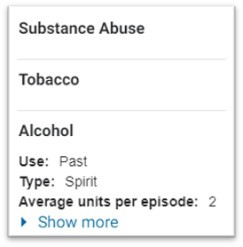
Why does my record show the words Substance Abuse / Tobacco, when I have never used these products?
In the social history section, if you see any words on their own without any further information beneath them, as in the example below, you can be reassured it means there is nothing recorded against these categories in the health record for you.
What should I do if the information showing in my health record is incorrect?
If you believe the error relates to something clinically important, then please contact the clinical service or team delivering your care. Contact information can be found on letters sent to you from the hospital, or you can find contact details for services through this link.
If the error is not urgent, please raise this with your clinical team next time you are visiting the hospital so that it can be corrected.
Letters and other documents
Appointments and appointment letters
When you are booked a new outpatient appointment, you will receive a text message from NHSMyCare
Once you have registered, you will be able to log in and view that appointment letter. You will also be able to view other appointment-related letters in the portal, for example if the Trust cancels or reschedules your appointment.
You may not see all appointments and appointment letters as there are some services currently unable to display these online.
Other documents and letters
Letters and documents that are routinely posted to you, as well as some documents that are printed and given to you during your hospital visit or appointment, will also be available to view in MyCare.
This includes outpatient clinic outcome letters, inpatient discharge summaries, and other patient correspondence.
However, you may not see all historic letters. This is because only letters from 29th January 2024 are available online. Also, some services are currently unable to display letters online.
You will not receive a text alert when these type of letters and documents are added to your record.
Why do I sometimes see ‘pending’ against a document?
Documents and letters go through a checking process before being sent to you, this is why sometimes you may see a pending message whilst a document is being reviewed.
Patient information leaflets and other support
Information about your appointment may be included within your appointment letter or included as an additional document.
A searchable list of patient information leaflets can be found here. You can also see the advice and support we offer.
What happens if I choose to go paperless?
We are now able to go paperless for selected outpatient appointment letters.
When you initially registered to MyCare, you were asked to select your preference on whether you wanted to go paperless in the future.
You can change your preferences at any time. Go to the homepage and click My Details. Scroll down to the section called Your letter delivery to see if you are currently registered for paperless, or traditional post. To update your preference, click on the Change button.
Even if you choose to opt out of paper communications, we may still send you some letters by post, depending the hospital service.
Please see the full list of paperless services below. We hope to expand this list over time.
- Audiology (ASPH Only)
- Cardiology Outpatients
- Dermatology
- Diabetes and Endocrinology
- Ear, Nose and Throat (ENT)
- Fractures and Orthopaedics
- Gastroenterology Outpatients
- General Internal Medicine Service
- General Surgery Service
- Geriatric Outpatients
- Maternity and Ante-natal appointments (visible under Midwife Episode)
- Maxillo-Facial
- Neurology Outpatients
- Ophthalmology
- Orthodontics
- Orthopaedics
- Pain Management
- Physiotherapy and Occupational Therapy
- Plastic Surgery
- Podiatry
- Pre-operative assessment
- Respiratory Medicine
- Rheumatology
- Trauma and Orthopaedics
- Urology
Will I see all my hospital appointments on MyCare?
Not all types of appointments are available on MyCare. All outpatient appointments that are available on MyCare will be visible. Others will be added over time as we continue to develop the portal.
Historic appointments from 29 January 2024 will be available. Any appointments before this date will not be visible.
- Audiology (ASPH Only)
- Cardiology Outpatients
- Dermatology
- Diabetes and Endocrinology
- Ear, Nose and Throat (ENT)
- Fractures and Orthopaedics
- Gastroenterology Outpatients
- General Internal Medicine Service
- General Surgery Service
- Geriatric Outpatients
- Maternity and Ante-natal appointments (visible under Midwife Episode)
- Maxillo-Facial
- Neurology Outpatients
- Ophthalmology
- Orthodontics
- Orthopaedics
- Pain Management
- Physiotherapy and Occupational Therapy
- Plastic Surgery
- Podiatry
- Pre-operative assessment
- Respiratory Medicine
- Rheumatology
- Trauma and Orthopaedics
- Urology
Accessibility and transport services
How accessible is MyCare?
It is important to us that MyCare meets your needs. MyCare is a ‘web-based’ app, what this means is you will be able to access it using your internet browser (e.g., Microsoft Edge or Google Chrome) from any suitable device, for example a modern smartphone, tablet, laptop, or PC.
You will be able to use built-in features on your internet browsers or device, such as the 'pinch and zoom' function to increase text size, screen readers and colour contrast.
MyCare has also been optimised to work with accessibility apps such as Yello and Voiceover.
Can I use MyCare to tell my hospital department that I need an interpreter or British Sign Language interpreter?
Unfortunately, you cannot do this at the moment. Please phone your hospital department about this or ask someone to phone them on your behalf.
Alternatively you can contact our Patient Advice and Liaison Service who will be able to inform you of the support available
Can I use MyCare to tell my hospital department that I need reasonable adjustments to be made for my outpatient appointment?
Unfortunately, you cannot do this at the moment.
We have AccessAble on our website that gives you accessible information for our sites, click here to find out more.
Can I use MyCare to request or book patient transport services?
Unfortunately, you cannot do this at the moment.
More information on transport can be found on our Help with Transport page.


